
1/12/19
Python f-strings. Formating faster and better
1/8/19
Python: Using nested multiple assigment in your code
Go past simple multiple assignment taught in beginning python courses to understand unpacking nested sequences with these techniques. (also known as deep unpacking)
11/22/18
Python Tuples: detailed overview
Python tuple detailed
Contents
Intro to tuples
Creating a tuple
Visual showing how immutable works
A look at dir() of list vs. tuple
Tuple operations
What is packing/unpacking
Packing/unpacking in function parameters
* in assignment on right side is unpacking
* used on left for packing
Nested assignment by example
Combining * and nesting
Extra: python bytecodes for creating tuples
Intro to tuples (smaller, faster, safer than lists)
Tuples are a workhorse data structure in Python for both the programmer and internally. They are faster and smaller than lists. The are involved with function parameters, packing and unpacking, and the multiple assignment statement. This article will detail everything I could find that you should know about them from basics to advanced.
b = ( 1, 2, 'abc')  # tuple - immutable, can't change the items referenced
a = [ 1, 2, 'abc']  # list -- you can add, change, or remove items referenced

both tuples and lists can reference any type of data
unlike languages like C++ or java arrays
A tuple is an array of object references and it is ordered and indexed from zero.
You cannot modify a tuple entry (immutable), but you can modify the object that is referenced by a tuple slot.
Note that all the basic data types in python that you can write as a literal: int, float, string, complex, boolean are also immutable.
Advantages of tuples over lists:
- faster, and less memory than lists
- immutable feature leads to less possibility of bugs
since it can't be changed after it is created - tuples can be used for keys in dictionary
Disadvantage of tuples
- you must add all the members of the tuple on creation
- you cannot add, remove, insert, or rearrange the items in the tuple, you must create a new one
Creating a tuple
Simple tuples are a list of expressions in (), with a trailing , or not.
A trailing comma is only required if the list only has one item.
On the rare occation you need a empty tuple, you can use () or tuple().
t1 = (1, 1.4, 'hello', 22 + 5)  # using () with comma separated values/expressions
t2 = (1, 2, 4,) # you are allowed a trailing , in the list
t3 = () # creates empty tuple
t4 = tuple() # also creates an empty tuple
print(f'\nt4: {t1}\nt5: {t2}\nt6: {t3}\nt4: {t3}')
This figure shows how each tuple slot actually is a reference to an object, and each object in a tuple and be different types unlike languages like C, C++, or java.
Below is code showing several ways to create a tuple, see the comments for descriptions of what is happening.
t2 = (55)  # This does not create a tuple but just the integer 55
print(f'\nt2 type: {type(t2)} value: {t2}')

t3 = (55,)  # trailing comma needed to create a tuple with one item
print(f't3 type: {type(t3)} value: {t3}')

# use the constructor with a generator, list, string or any other non infinite iterable
t4 = tuple(range(5))
t5 = tuple("hello") # -> ( 'h', 'e', 'l', 'l', 'o')
t6 = tuple(( i**2 for i in range(1,11))) # squares of 1 to 10
print(f'\nt4: {t4}\nt5: {t5}\nt6: {t6}')
tuple definitions allow for any multiline formating including variable indents inside the ( ):
Note: any data in (), [], {}, has this flexibility of 'escaping' fromm the indentation rules in python
The definition below shows an example of using this flexible indentation code formattiing:
foo_data = (
         10,
       30,  30,
    40,  50,   60,
  70,  80,  90, 100,)
Visual showing how immutable works:
If you use the link below, and step though the code line by line, you will see a demostration of what immutable means with a simple example.
http://www.pythontutor.com/visualize.html#mode=edit
list1 = ['a', 'b', 'c']
tuple1 = (1, 2, list1)
tuple1[2][0] = 43
tuple1[1] = 'x'  # will cause error
A look at dir() of list vs. tuple
Try this code to see a list of all the attributes that a list and a tuple have. The last group of code just shows you the attributes that a list has that is not shared with a tuple.
print('\n\n--list attributes:')
print('attributes:', dir(list()))
print('number:', len(dir(list())))

print('\n\n--tuple attributes:')
print('attributes:', dir(tuple()))
print('number:', len(dir(tuple())))

print('\n\n--attributes from list that are not in tuple: set(list - tuple):')
diff = set(dir(list())) - set(dir(tuple()))
print('attributes:', diff)
print('number:', len(diff))
Tuple operations:
These are all the basic operations and functions on a tuple, this is well covered in any python course, so I will not elaborate here.
| operation | code, t is tuple | description |
|---|---|---|
| len | len(t) |
number of elements in t |
| in | 43 in t |
true if 43 in t |
| min | min(t) |
smallest value in t |
| max | max(t) |
largest value in t |
| count | t.count(3) |
number of times 3 occurs in t |
| constructor | tuple(range(4)) |
new tuple from iterable |
| index | t[3] |
fourth item in tuple |
| slice | t[start:end:step] |
normal slice and variations same as lists |
| add | (1,2) + (8,9) |
concatenate two tuples into new tuple (1,2,8,9) |
| multiply | (1,9) * 3 |
concatenate itself 3 times (1,9,1,9,1,9) |
What is packing/unpacking (moving to more advanced concepts)
packing: placing a list of values into a tuple
unpacking: copying values from a tuple into individual variables
Examples:
person1 = ("joe","thomas", 45, 54_300.00) # packing, it is also just tuple creation
print(person1)

person1 = "joe","thomas", 45, 54_300.00   # note that () are not needed as shown here
print(person1)

(first, last, age, salary) = person1     # unpacking tuple into individual variables
first, last, age, salary = person1       # () are not needed here either
print( f"first: {first}, last: {last}, age: {age}, salary: {salary}")

# doing both at once is how multiple assignment works
first, last, age, salary = "mary", "shelly", 33, 88_500.00
print( f"first: {first}, last: {last}, age: {age}, salary: {salary}")

t1 = ((1,2), (1,3), (0,8), (9,9), (10,1))
for x, y in t1:  #  unpacking in for loop
    print(f'point@ ({x}, {y})')

def return_three():
    return 1,2,3 # packing multiple return values

x, y, z = return_three() # unpacking multiple values from function
print(x, y, z)
Packing/unpacking in function parameters
* used in front of a parameter in a call will unpack list or tuple
# first setup a function with three parameters
def print3(a, b, c):
    print(a, b, c)

print3(1, 2, 3)

list1 = (1, 2, 3)

print3(*list1) # * causes unpacking of tuple or list into argument variables
* used in def of function before a parameter will pack parameters into tuple
def printn(*args): # packs parameters into tuple args
    print('len', len(args))
    print('args:', args)

printn(1, 2, 3)
printn(43)
printn(*list1, 4) # expand list1 into first three parameters and then 4 as fourth parameter
* in assignment on right side is unpacking
list1 = (1, 2)
list2 = (5, 6)
x = list1, list2
print(x)

x = *list1, *list2 # same as  list1 + list2
print(x)

x = list1 + list2
print(x)
* used on left for packing
first, *rest = (1, 2, 3, 4, 5)
print(f"first: {first}, rest: {rest}")

first, second, *rest = (1, 2, 3, 4, 5, 6)
print(f"first: {first}, second: {second}, rest: {rest}")

# *half1, *half2 = (1, 2, 3, 4, 5, 6) # can't do this

first, *mid, last = (1, 2, 3, 4, 5, 6)
print(f"first: {first}, mid: {mid}, last: {last}")
Nested assignment by example
Nested assignment is where the left side of the assignment has nested tuples with varible names that then recieve a corresponding nested structure on the right side.
point1 = (1, 2)
point2 = (5, 6)
color = "blue"
line1 = (point1, point2, color)
print(f"line1: {line1}")

p1, p2, c = line1
print('p1, p2, c', p1, p2, c)
print(f"p1: {p1}, p2: {p2}, c: {c}")

(x1, y1), p2, c = line1
print('x1, y1, p2, c2:', x1, y1, p2, c)
print(f"x1: {x1}, y1: {y1}, p2: {p2}, c: {c}")

(x1, y1), (x2, y2), c = line1
print(f"x1: {x1}, y1: {y1}, x2: {x2}, y2: {y2}, c: {c}")
Combining * and nesting
You can combine nesting and packing as shown below.
x = (1, 2, 3)
y = (7, 8, 9)
z = (x, y)  # ((1, 2, 3), (7, 8, 9))
(a, *b), (*c, d) = z
print(f"a: {a}, b: {b}, c: {c}, d: {d}")
Extra: python bytecodes for creating tuples
This shows you a dissasembly to python bytecodes for common tuple creation. It show the big differnce if the tuple is formed from literal basic values, or from variables or none literal values
from dis import dis
def dis_this(stmt):
    print(stmt,":")
    print(dis(stmt))

a = 123
b = 65

dis_this('x = (a, b)')  ## tuple from non literal values
dis_this('x = (1, 2)')  ## tuple from literal values
Output from these two lines show the difference between a all literal tuple, and one that has non-literal values:
x = (a, b) :
  1           0 LOAD_NAME                0 (a)     -- since a and b are not literals
              2 LOAD_NAME                1 (b)     -- they are loaded on stack
              4 BUILD_TUPLE              2         -- and the special BUILD_TUPLE creates
              6 STORE_NAME               2 (x)     -- a new tuple and assigns to x
              8 LOAD_CONST               0 (None)
             10 RETURN_VALUE

x = (1, 2) :  -- when literal values are used, tuples are stored whole and just referenced
  1           0 LOAD_CONST               3 ((1, 2))
              2 STORE_NAME               0 (x)
              4 LOAD_CONST               2 (None)
              6 RETURN_VALUE
Try these and see the bytecodes generated:
dis_this('x = (1, True, "hello", 1.5, 1+3.5j)')
dis_this('x = tuple(range(3))')
dis_this("x = (1,2,('green','blue','red'))")
dis_this("x = ([1,2],[3,4])")
I hope you enjoyed this article. Please sign up to my Youtube Channel: YouTube Signup
9/21/18
PyCharm and Virtualenv: Package Management Basics
i.e.
import requests or
from bs4 import BeautifulSoupThere are 212 built-in standard packages that are installed with python and over 150 thousand third-party packages available from PyPi.org and installed with the
pip install package-name commandSystem Python version:
| Platform | Paths to Interpreter and Packages |
|---|---|
| Mac (10.13) | Interpreter: /System/Library/Frameworks/Python.framework/Versions/3.7/bin/python3.7and /usr/local/bin/python3.7 -- symlinked to above pathPackages: /System/Library/Frameworks/Python.framework/Versions/3.7/bin/lib |
| Win 10 | Interpreter: C:\Users\name\AppData\Local\Programs\Python\Python37-32\python.exePackages: C:\Users\name\AppData\Local\Programs\Python\Python37-32\lib\site-packages\ |
| Linux | Interpreter: /usr/bin/python3.7Packages: /usr/lib/python3/dist-packages |
Virtual Environments (venv):


- Your choice of project python version
- A venv folder at the top level of your project folder
- All python code in you project will search the venv folder from you project folder when doing imports of third-party packages
- There will be no connection to the python packages from your project. If you need any new python packages for your code, you will need to go to the PyCharm settings or preferences menu and choose Project Interpreter:
 Notes: the packages you see are automatically populated into your virtual environment.
You are now free to use the + button at bottom to search and install any package, or update.

Using Inherit global site-packages

- Your choice of project python version
- A venv folder at the top level of your project folder
- All python code in you project will search the venv folder from you project folder when doing imports of third-party packages, and if it did not find the package in your project venv, then it will look for it in the base Interpreter package library (a.k.a. global site-packages.)
- Any new packages you install or modify from preferences > Project: Project Interpreter will 'shadow' the same package if it is in the installed system library, meaning your code will use the one you installed or modified in your project venv. If you remove the package from your venv area with the minus (-) button, then your project will again find the system package.

The Take Away:
- Usually, just let PyCharm default to create a venv that is not dependent on the system package library, then just add or change packages as needed for that project.
- In the case you want to 'share' your global packages, so you don't have to setup up every project's packages, then use the 'inherit global site-packages' option
- PyCharm can manage all your packages nicely from within the IDE dialogs.
For more information see the PyCharm References at the JetBrains Site:
9/5/18
Python 3.3+ Immutable Binary Search Tree (unbalanced) < 25 Lines of Code
While on the way I wrote a less than 25 line immutable binary search tree implementation that is function based and though it would be good to share it with you.
Immutable here means that any other thread or co routine that has the tree, can reference it without it changing.
Since insertion create a new tree that shared all unchanged parts of the original tree. The tree is a recursive structure of nodes that contain other nodes. Each node can have a sub tree under it.
Calls for inserting a new value or searching The code works as as follows:
i.e.
tree = None -- before you start with any values
set your variable for the tree to None
(you could call it mytree or
anything other than tree)tree = insert(tree, value) -- call insert with your tree variable and
it will return a new tree value.if contains(tree, value):
...-- call contains to check if value is in tree in_order(tree) --returns a generator to sequence
through all values in sorted order
or
for value in in_order(tree):
print(item)
print(list(in_order(tree)) -- convert generator to list to print
Here is the complete code from my gist site: Enjoy! If you have any ideas for future blogs or videos or want to contact me, go to contact form
9/3/18
Drawing SVG paths in Python (expanding svg beyond web design) for PyGame, Tkinter, & Turtle
Python has always had a rich GUI and graphics options. Some of them built-in such as Tkinter and Turtle Graphics, and also other modules like PyGame, PyOpenGL, Matplotlib.
The Web which started off with fairly primitive graphics ability with animated gifs, images, and java applets, but now has dynamic JavaScript, CSS, and especially Scaled Vector Graphics (SVG).
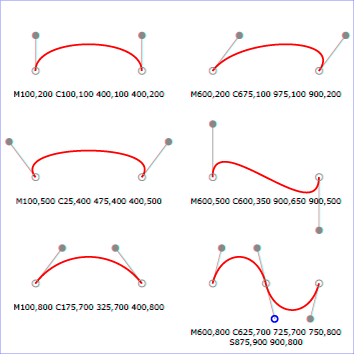
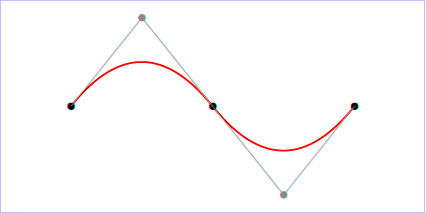
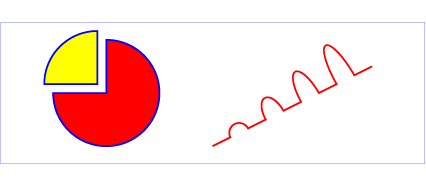
SVG Paths are particularly great for defining curving paths that combine lines, ellipses, cubic and quadratic Biezer curves.
I will show you a package for python that will allow you to draw paths in PyGame, TKinter, and with Turtle Graphics:
The all use the svg.path package that can be installed with pip install svg.path or pip3 install svg.path. (See svg.path · PyPI )
This library allows you to draw paths with lines, cubic and quadratic beizer curves, and ellipses. It will create a path by a series of method calls, or by using a path string as specified for the SVG d attribute for CSS: (see Mozilla SVG curves tutorial)
Quadratic Path:
from svg.path import Path, Line, Arc, CubicBezier, QuadraticBezier, parse_path
d = "M100,200 C100,100 250,100 250,200 S400,300 400,200"
p = parse_path(d)
The code above would define a path object named x that would represent the path defined by the string in d. This path defines a move to 100,200 and then two cubic curves:
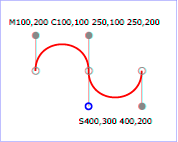 |
| Red Curve Shows Path |
we can call the point method to get a x,y position on the path expressed as a python complex number for a percent distance along the path expressed as a fraction from 0.0 to 1.0.
p x.point(0.5)
would return the point half way along path: (250+200j)
p2 = (p.real, p.imag) would convert the complex number to a tuple (250, 200) representing the x and y values referenced by p2.
Now complete code to render path to PyGame Window (associated video):
Now code for tkinter window:
Now code for turtle graphics window (note in turtle graphics curve is flipped vertically since the y axis is positive in the upper direction:
HAVE FUN!
-- Professor Gerry Jenkins
8/8/18
From install to run for python3.7 and PyCharm on Mac
New Video for Python learners:
How to install the latest python on a mac including python, idle, and pip. How to then install free IDE called PyCharm. I will then step through creating a simple program and running it from PyCharm and the terminal.